
Teleprompter
A teleprompter inside the camera
Reading a script from a second device means looking away from the lens. Dual Recorder scrolls the script over the live preview itself, right under the front camera, while one or two cameras record. Set the speed, the size and how much of the picture shows through, and keep your eyes where the viewer’s are.
Your words over the picture
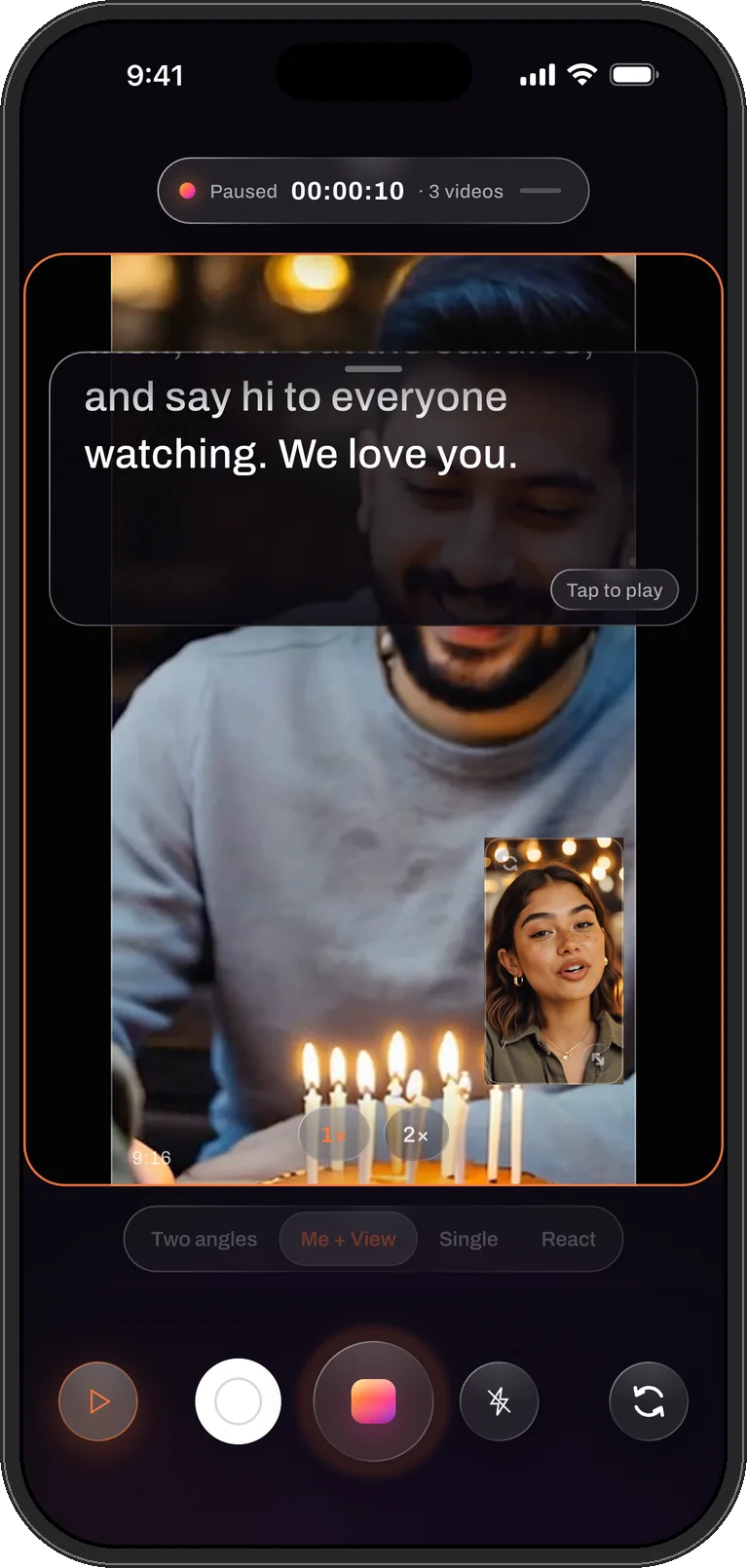
Open the teleprompter, paste or type the script, and it appears as a panel over the top of the preview. Play it and the text scrolls at the speed you set; the lines fade in at the top and out at the bottom so no sentence is ever cut by an edge.
Text size and scroll speed are yours to set. The Opacity slider decides how much camera shows through the panel, from a solid reading surface to a light veil, so the script can sit over the picture without hiding the shot you are framing.
Placed where your eyes already are
The panel sits near the top of the picture, just under the front camera, so reading and looking into the lens are almost the same movement. It never covers more than forty percent of the frame, and the grabber at its top drags it down if you want the words lower. The position is remembered between takes.
Made for two cameras
The teleprompter shines in Me + View mode. The front camera films you delivering the lines while the back camera records what you are talking about, and the take saves both. Tutorials, product walk-throughs, travel pieces and reaction videos all read better when the speaker never has to glance at a notes app.
The script is an overlay for you, not for the file: it is never recorded into the video.
No script yet? Let Apple Intelligence write one
On iPhones with Apple Intelligence, Script it drafts a teleprompter script from a line about what you want to say, on the device, ready to edit before you read it. Script it is part of PRO, and phones without Apple Intelligence are simply not shown it.
Pause, captions and the take
A take can be paused and resumed without ending it, so a stumble costs a pause rather than a restart. On iOS 26, live captions can run alongside the script: the words you actually said are saved with the take, ready to correct in the editor.
It steps aside when it should
In photo mode there is nothing to read, so the panel is hidden. While recording without a script it is hidden too, and the controls it would sit over stay reachable. Press and hold the panel to jump back to the top of the script before the next take.
Reading well on camera
- Write in short lines. A line that fits the panel’s width is read in one glance; a paragraph is read with visible eye movement.
- Set the speed by reading aloud once. If you are chasing the text, slow it down; the pauses are where you sound like yourself.
- Turn the opacity up in bright scenes. Over a sky or a white wall a heavier panel is easier to read than a bigger font.
- Correct the words later, not the take. With on-device captions a stumble can be fixed in the transcript rather than reshot.
Questions
Teleprompter, answered
Is the script visible in the recorded video?
No. The teleprompter is an overlay for the person filming. The video contains the cameras only, arranged the way the layout says.
Does the teleprompter work with a single camera?
Yes. It works in every video mode: Me + View, Two angles and Single. It is hidden in photo mode, where there is nothing to read.
Can I move the script panel?
Yes. Drag the grabber at the top of the panel to bring the text lower; the panel never covers more than forty percent of the frame, and its place is kept for the next take.
Read the script. Hold the lens.
Dual Recorder: Dual Camera is available now on the App Store for iPhone.